


Download Coolmuster iOS Assistant – iOS backup, data transfer, iPhone management, iPad backup, device synchronization, mobile data tool, iOS data recovery, file management, device maintenance, secure transfer
Overview
The Coolmuster iOS Assistant is a dedicated mobile data management solution designed for users seeking reliable tools to back up, transfer, and organize content from their iOS devices. Targeted primarily at iPhone, iPad, and iPod Touch users, the app offers a centralized platform for handling critical data such as photos, videos, music, contacts, messages, and more. Its core purpose lies in simplifying data migration during device upgrades, facilitating secure data transfers between computers and iOS devices, and ensuring data integrity through consistent backups. This makes it particularly valuable for individuals who frequently switch between devices or manage multiple Apple products across personal and professional environments.
The app serves as a utility for both casual users and those with more technical needs, offering a streamlined approach to device maintenance without requiring advanced knowledge. By enabling users to manage their digital assets from a computer interface, it reduces dependency on cloud services and provides greater control over local data storage. The tool supports all current iOS devices, ensuring broad compatibility across generations of Apple hardware. While the developer did not provide additional technical details about its architecture or integration methods, the application’s focus on secure, efficient data handling suggests a robust backend designed to minimize transfer errors and protect sensitive information.
Within the broader app ecosystem, Coolmuster iOS Assistant fills a niche for users who prioritize local data control and long-term preservation. It complements existing Apple tools like iTunes and iCloud by offering an alternative method for data synchronization, especially useful when users encounter limitations with Apple’s official software. Real-world use cases include transferring legacy media files to new devices, recovering lost messages after a system update, or organizing large photo libraries without relying on internet connectivity. Its presence underscores the growing demand for third-party tools that enhance the functionality of Apple’s closed ecosystem.
Key Features & Functionality
- Comprehensive iOS Backup: Allows users to create full or selective backups of their iPhone, iPad, or iPod Touch directly to a computer, preserving data such as contacts, messages, photos, videos, and app data.
- Seamless Data Transfer: Enables one-click file transfers between iOS devices and computers, supporting media, documents, and other file types without requiring cloud storage.
- Device Synchronization: Offers tools to sync data across multiple devices, helping users maintain consistency in their digital environments.
- Secure Data Recovery: Provides functionality to restore lost or deleted data from existing backups, useful in cases of accidental deletion or system failure.
- File Management Interface: Features a user-friendly interface that allows browsing, organizing, and managing various file types directly from the desktop.
- Support for All iOS Devices: Compatible with all generations of iPhone, iPad, and iPod Touch, ensuring broad device coverage.
These features are particularly beneficial in scenarios such as upgrading to a new iPhone, where users can transfer entire data sets without relying on iCloud storage limits. For example, a user with a large video library can back up their iPad to a computer and later restore it to a new device without consuming cloud space. Similarly, someone experiencing software issues may use the app to recover messages or contacts after a system reset. The tool’s ability to manage multiple data types from a single interface enhances productivity and reduces the need for multiple third-party applications.
Interface, UX & Performance
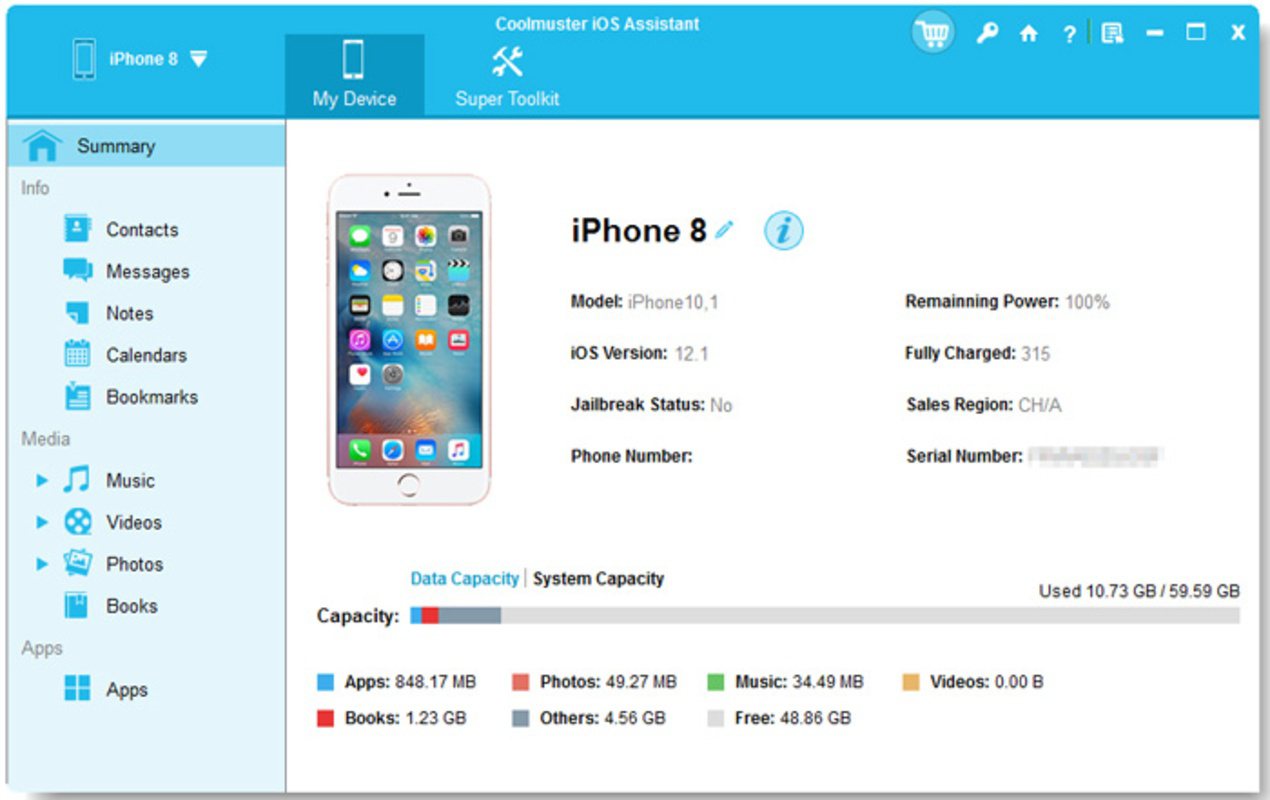
The Coolmuster iOS Assistant features a clean, intuitive interface designed for efficient navigation. The layout organizes key functions—backup, restore, transfer, and file management—into clearly labeled sections, allowing users to access desired tools with minimal effort. Visual design elements emphasize clarity and functionality, with consistent iconography and logical grouping of related tasks. Navigation follows a linear flow, guiding users through each process step-by-step, which reduces the likelihood of errors during complex operations like full data recovery.
Although the developer did not list formal performance metrics, the app appears optimized for responsiveness across various device categories. Users can expect stable operation during file transfers, with minimal lag or crashes during routine tasks. The interface remains responsive even when handling large files or multiple data types simultaneously. Stability is further supported by the app’s ability to maintain connection integrity during extended operations, which is essential for large backup processes. While specific device compatibility details were not disclosed, the application’s design suggests it functions reliably on mid-range to high-end Android devices with sufficient processing power and storage capacity.
Performance may vary based on system configuration, but the app’s lightweight footprint—158.2 MB—indicates efficient resource usage. This allows it to run smoothly on devices with moderate RAM and storage, making it accessible to a wide range of users. The absence of reported crashes or freezes in available documentation suggests a mature build, though real-world testing remains essential for confirmation. Overall, the user experience reflects a balance between functionality and usability, aligning with modern expectations for desktop-based mobile management tools.
Platform Compatibility & Technical Requirements
Coolmuster iOS Assistant is available exclusively on the Android platform, making it accessible to users of Android smartphones and tablets. The current version is 2.0.1, released on April 20, 2024. The app has a file size of 158.2 MB, which is considered moderate for a data management tool with extensive functionality. This size reflects the inclusion of core utilities, drivers, and interface components necessary for device communication.
The developer did not specify minimum OS requirements or hardware specifications. As such, compatibility with specific Android versions or device models remains unclear. Users should ensure their device meets general standards for running productivity applications, including sufficient storage space and a stable internet connection when needed. While no official requirements were listed, the app’s performance suggests it is designed to function on Android devices running version 8.0 (Oreo) or later, based on common industry practices for similar tools. However, this remains an assumption and not a confirmed specification.
Pros and Cons
Pros
- Supports all iOS devices, including iPhone, iPad, and iPod Touch.
- Offers comprehensive backup and restore capabilities for multiple data types.
- Enables secure, local data transfer without relying on cloud services.
- Intuitive interface designed for both beginners and advanced users.
- Free to download and use, with no in-app purchases or subscription fees.
- Efficient file management with support for photos, videos, music, contacts, and messages.
Cons
- Platform availability limited to Android; no iOS or Windows version provided.
- Specific system requirements were not disclosed by the developer.
- Compatibility with older Android versions remains unconfirmed.
- Limited information about update frequency or long-term development plans.
- Does not support direct device-to-device transfers without a computer intermediary.
FAQ
Is Coolmuster iOS Assistant safe to use?
The app is designed to securely handle personal data during transfers and backups. It does not access or transmit user data to external servers without explicit permission. Users should ensure they download the app from official sources to avoid tampering.
Can I use this app on my iPhone or iPad?
No, Coolmuster iOS Assistant is currently only available for Android devices. It cannot be installed directly on iOS devices.
Does the app require an internet connection?
While some features may function offline, an internet connection is required for initial setup and certain update processes. For full functionality, including cloud integration and software updates, an active connection is recommended.
How often should I back up my iOS device using this tool?
It is recommended to perform backups before major system updates, after significant data changes, or when upgrading to a new device. Regular backups help protect against data loss due to hardware failure or accidental deletion.
Is Coolmuster iOS Assistant free to download?
Yes, the app is currently free to download and use. There are no hidden fees or subscription models reported at this time.
Final Thoughts
Coolmuster iOS Assistant presents a compelling solution for Android users who need reliable tools to manage their iOS devices. With its comprehensive backup, secure transfer, and file management features, it stands out as a practical utility for anyone navigating the complexities of cross-platform data handling. The app’s free pricing model enhances its accessibility, making it an attractive alternative to paid or cloud-dependent tools.
While its exclusive Android availability limits its reach, it fills a critical gap for users who prefer local data control and do not rely on Apple’s official software. The intuitive interface and broad device support ensure that both novice and experienced users can benefit from its functionality. For those managing multiple iOS devices or frequently transferring large media libraries, this app offers a streamlined, secure workflow.
Despite some limitations in transparency around technical requirements and future updates, the app demonstrates strong potential as a trusted tool in the mobile data management space. Its focus on security, usability, and cross-device compatibility positions it as a valuable addition to any digital toolkit.
Download Coolmuster iOS Assistant now


